The Knowledge Management Agent: Turning Resolution into Institutional Memory
In my previous post, I discussed why the Evaluation Agent is the keystone of an AI-driven service organization. But evaluation only works if there is a baseline of truth to measure against. In the world of Dynamics 365, that «truth» is your Knowledge Base.
Historically, knowledge has been a service bottleneck. It’s expensive to author, difficult to maintain, and frequently out of sync with how issues actually appear in real customer interactions. Most organizations suffer from «Knowledge Decay» a phenomenon where the distance between what is documented and what is actually happening grows wider every day.
The Customer Knowledge Management (KM) Agent directly targets this failure mode. If you care about Copilot quality, you care about knowledge quality. This agent focuses on the hardest part of KM: keeping the knowledge base fresh, relevant, and grounded in actual resolution work.
From Static Documentation to Living Memory
The KM Agent fundamentally changes the «Authoring» workflow. Rather than relying on manual drafting after the fact, it autonomously harvests insights from the front lines of your service operation.
It transforms the different bits of a service interaction such as resolved cases, conversation transcripts, emails, and internal notes. Which in turn is turned into structured, searchable knowledge articles.
This happens in two distinct but complementary phases:
1. The Retrospective: Unlocking the «Gold in the Basement»
Most companies are sitting on years of historical case data. This data is an untapped goldmine of institutional memory, but it’s usually buried in closed records. The KM Agent can process this historical data in bulk, identifying recurring patterns and successful resolutions that were never documented. It allows you to create a high-quality knowledge base by mining your past successes before you even flip the switch on real-time automation.
2. The Real-Time: Closing the Gap in Minutes
Once your baseline is established, the agent moves into «Harvesting» mode. The moment a case is resolved or a conversation ends, the KM Agent:
- Analyzes the context: It looks at the case title, description, and the actual email/chat thread.
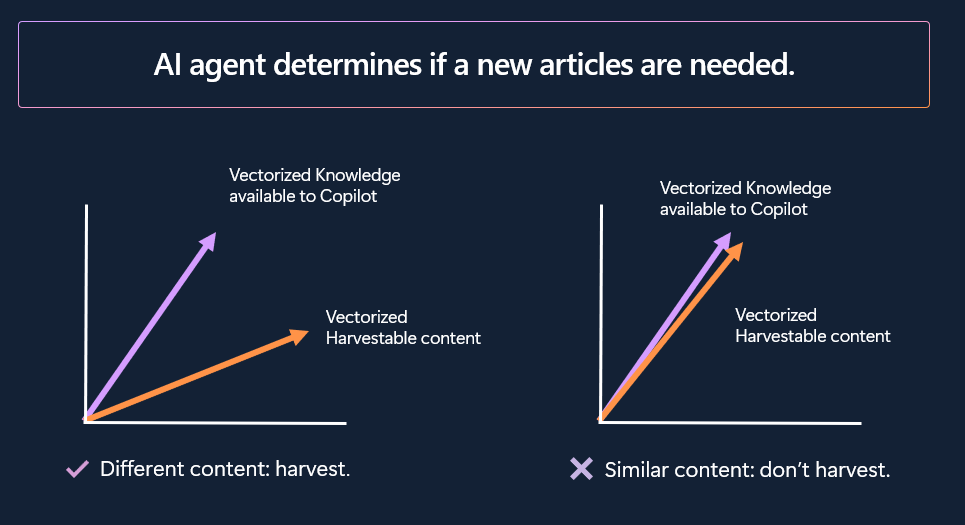
- Checks for Duplication: It compares the new resolution against the existing KB to ensure it isn’t creating redundant content.
- Scrubs Data: It automatically removes PII (Personally Identifiable Information) to ensure compliance.
- Drafts or Updates: It either creates a new draft for review or suggests an update to an existing article to reflect a new solution variant.
Technology: Structure, Similarity, and Speed
The agent doesn’t just copy-paste text; it uses advanced logic to ensure high-quality, non-redundant documentation:
- Standardized Formatting: Every article is drafted in a structured Issue-Cause-Resolution format, making it optimized for both human reading and AI retrieval.
- Vectorized Similarity Engine: Using vectorization, the agent compares new content against your existing library. If the content is new, it creates a draft; if it’s similar, the agent can automatically update the existing article with a new version to keep it fresh.
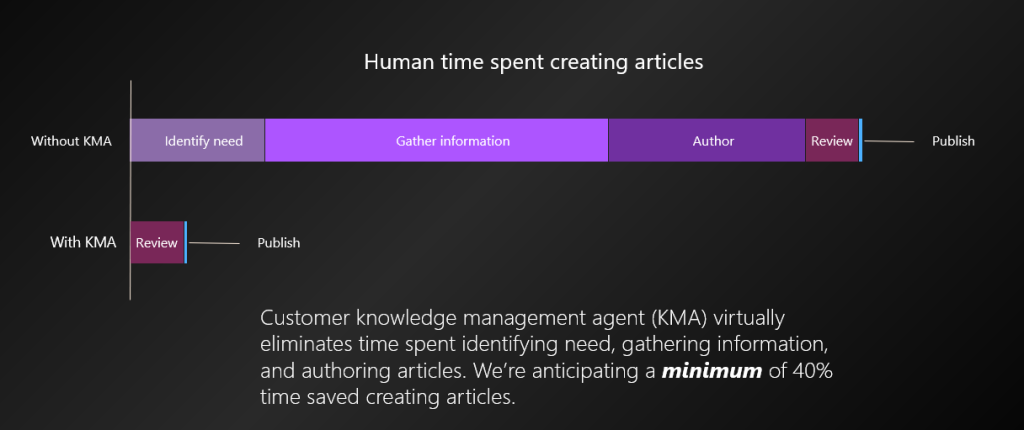
- Massive Efficiency Gains: By eliminating the manual work of identifying needs and gathering info, Microsoft anticipates a minimum of 40% time saved in article creation.
Why This Matters for Copilot
We often talk about «Grounding» in AI. When a customer or agent asks Copilot a question, the AI searches your Knowledge Base for the answer. If your knowledge base is empty, outdated, or written in «corporate-speak» that doesn’t match how customers actually describe problems, Copilot fails.
By using the KM Agent, you ensure that Copilot is grounded in actual resolution work. The AI isn’t just guessing; it’s retrieving the specific steps that solved a similar issue ten minutes ago.
Governance and Trust: AI with Guardrails
Moving to an autonomous knowledge model doesn’t mean losing control. The KM Agent includes built-in protections to ensure accuracy and compliance:
- Privacy First: The agent automatically scrubs personal data (PII) and sensitive information from the source content before drafting anything.
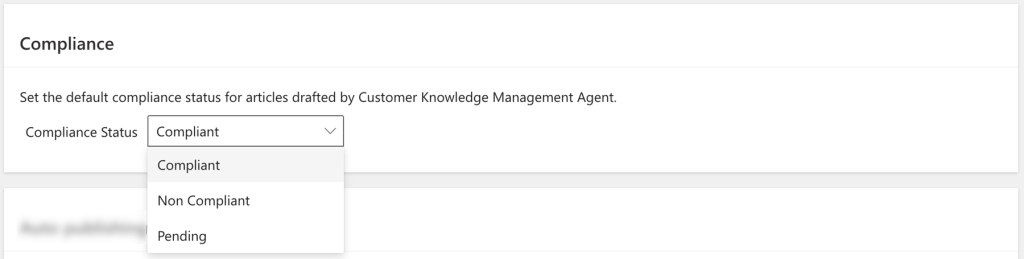
- Tiered Compliance: Administrators can define the default status for AI-generated drafts Pending, Non-Compliant, or Compliant ensuring human experts remain the final gatekeepers.
- Audience Control: You decide who sees the output. Articles can be restricted to Internal Audiences (human reps) or published for External Audiences to power public self-service.
Closing the Loop
The KM Agent is the final piece of the «self-learning loop.» It extracts new intents to update your Intent Library while simultaneously building the Knowledge Articles that provide the solutions.
By turning every resolved case into a permanent asset, you ensure that your organization never has to solve the same problem twice. Your knowledge base stops being a static library and starts being the engine that drives your entire autonomous service experience.
Ready to start harvesting? The KM Agent is now Generally Available. You can begin by enabling it in your Dynamics 365 environment and seeding your library with your historical case data
Setting Up the Customer Knowledge Management Agent
Transitioning to an agentic knowledge model is straightforward, but it requires a specific sequence of technical prerequisites to ensure the AI can securely access and process your data.
Phase 1: Technical Prerequisites
Before you can activate the agent, your environment must meet the following baseline requirements:
- Entity Access: You must be using out-of-the-box case or conversation entities, or a custom Dynamics entity specifically configured for cases.
- Knowledge Infrastructure: Dynamics 365 knowledge management must be fully configured, and Copilot must be enabled to access the existing knowledge base.
- Billing: Your tenant must have pay-as-you-go billing established for AI services.
- Global Settings: If your data resides in different regions, you may need to enable generative AI features that allow data to move across geographical boundaries.
Phase 2: Activation Steps
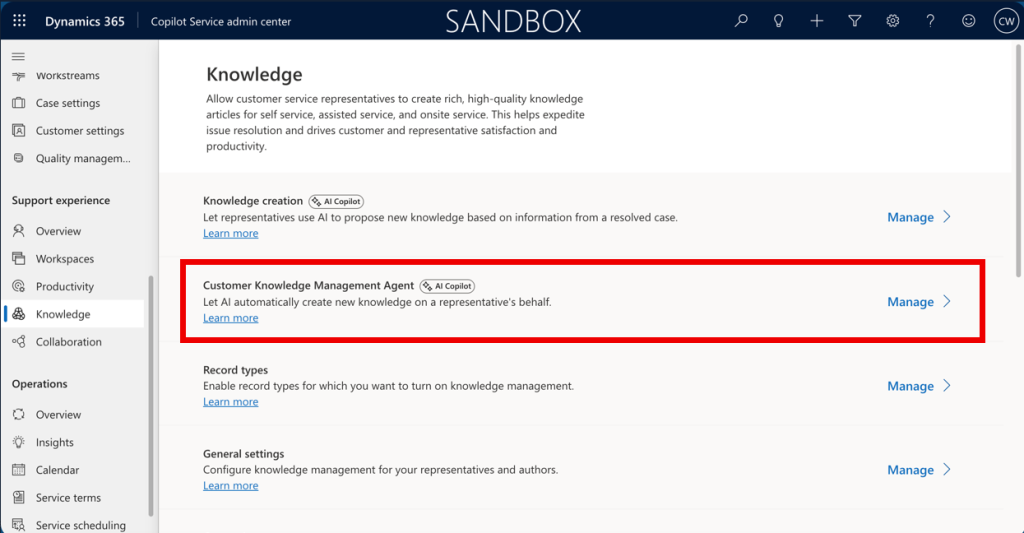
Once the prerequisites are met, follow these steps in the Customer Service admin center to enable the agent:
Phase 3: Configuration & Rule Management
The true power of the KM Agent lies in how you direct its focus. In the Customer Knowledge Management Agent settings, you can define granular rules for both historical and real-time data:
- Historical Mining: Set rules to define which of your most recent 50,000 cases or conversations should be considered for bulk article creation.
- Real-time Rules: Configure «Manage rules» for active cases and messaging sessions to dictate exactly when the AI should trigger a knowledge harvest.
- Compliance Defaulting: Select your preferred Compliance Status (e.g., «Pending» or «Non-Compliant») for all new drafts to ensure a human reviewer always sees the content before it goes live.
Conclusion: The New Lifecycle of Knowledge
We are moving away from a world where «Knowledge Management» is a chore performed by a separate team. In the agentic era, knowledge is a byproduct of doing the work.
The Customer Knowledge Management Agent ensures that every solved problem becomes a permanent asset for the organization. It turns individual expertise into institutional memory, ensuring that the next time a problem arises, the entire organization and every Copilot already knows the answer.
My closing tip: Don’t «boil the ocean» on day one. Start by enabling AI-assisted mode where the agent provides drafts for human review. Do this until you have built enough trust in the similarity engine and formatting to enable Auto-publishing for specific internal categories
For more technical details on configuring the KM Agent, you can refer to the official Microsoft documentation.