The Intent Agent: Making Intent a Platform Capability
In our previous explorations of the Evaluation Agent and the Knowledge Management Agent, we established the «Truth» and the «Standard.» Now, we address the «Brain» of it all – Intent.
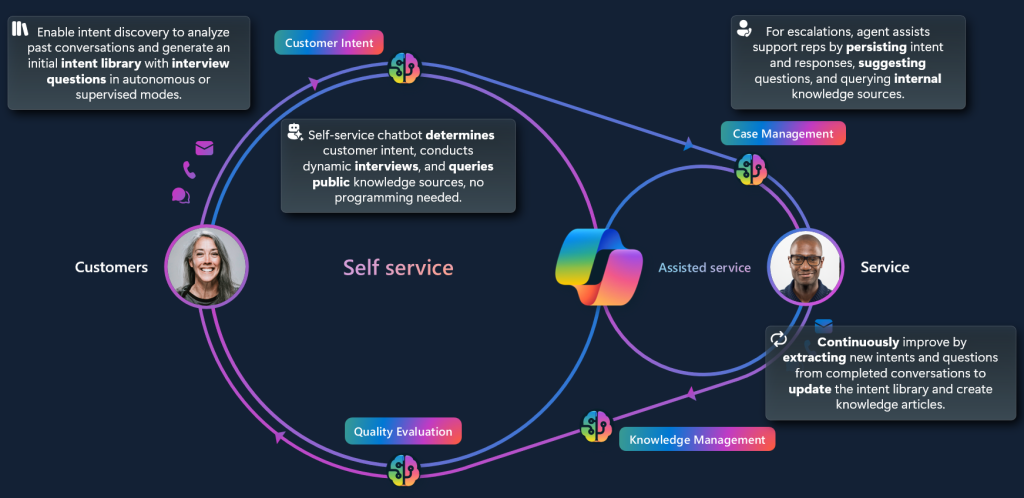
For years, we have treated Intent as a localized artifact. It was something locked inside a specific bot’s logic and hard-coded. The Customer Intent Agent fundamentally changes this by moving intent detection into the Intent Core, making it a shared platform capability across Dynamics 365.
Architectural Shift: Intent Core in Dataverse
The most significant change for an architect is where the «intelligence» resides. Historically, logic was trapped in conversational branches. With the Intent Agent, the logic is now beeing centralized in Dynamics
- Platform-Level Intelligence: Intent core serves as the brains, leveraging instructions, actions, and knowledge to resolve issues across all channels.
- The Component Collection: Copilot Studio now acts as a «pass-through,» redirecting to the Intent Core for high-level reasoning and only escalating when necessary.
- Self-Learning Loops: The system autonomously mines intents from completed conversations and cases to update the intent library in real-time.
The Mechanics of Autonomous Discovery
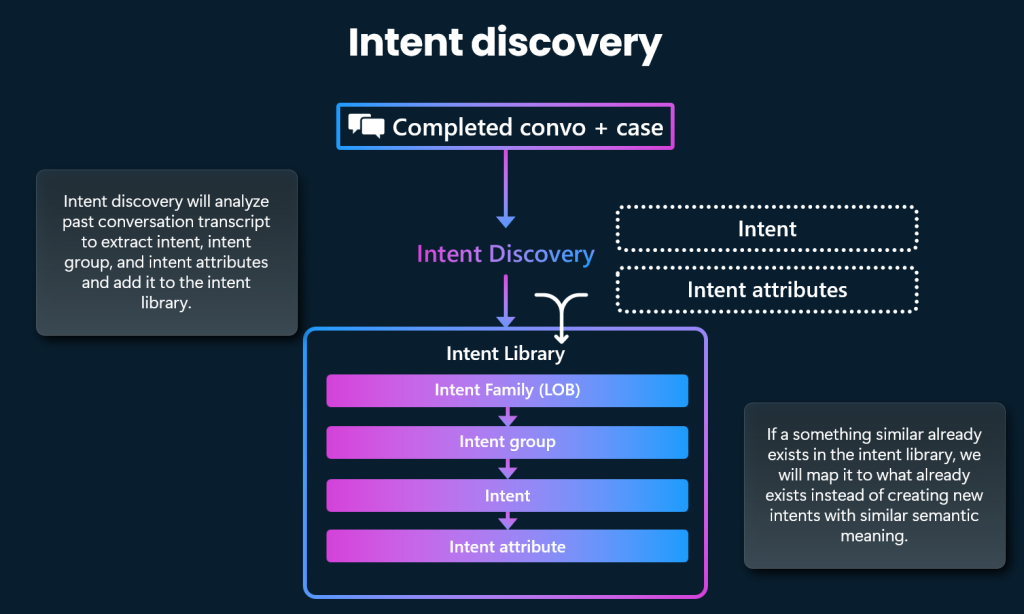
Architects no longer need to manually map every possible customer utterance. The agent uses generative AI to analyze transcripts and identify recurring patterns.
- Hierarchical Organization: Intents are structured into a clean hierarchy: Intent Family (LOB) → Intent Group → Intent → Intent Attribute .
- Semantic Mapping: If a customer outreach matches the semantic meaning of an existing intent, the system maps it automatically instead of creating a duplicate entry.
- Attribute Extraction: The agent identifies «Intent Attributes» critical data points like product models or error codes to power dynamic troubleshooting interviews.
Closing the Service Loop
To build a truly autonomous experience, the Intent Agent must work in concert with the Case and Knowledge agents.
| Feature | Architect’s Value Proposition |
| Disambiguation | The agent conducts dynamic interviews in self-service to clarify intent without hard-coded trees. |
| Knowledge Harvesting | Discovered intents directly inform the Knowledge Management Agent on where gaps exist in the documentation. |
| Proactive Routing | Intent-based routing uses the Intent Core to ensure the case reaches the right human or AI handler immediately. |
Implementation Guide: Getting the «Brain» Online
For architects ready to trial this, the setup follows a specific technical path to ensure data security and performance.
Phase 1: Environment Readiness
- Entity Configuration: Ensure you are utilizing out-of-the-box or custom Dynamics entities for cases and conversations. This is getting more and more important.
- Dataverse Connections: Enable the required Dataverse Connection References and turn on Power Automate Cloud Flows specifically for agent actions.
- Licensing: Ensure Copilot Credits are set up for AI utilization and Pay-as-you-go billing is active.
Phase 2: Setup of the agent
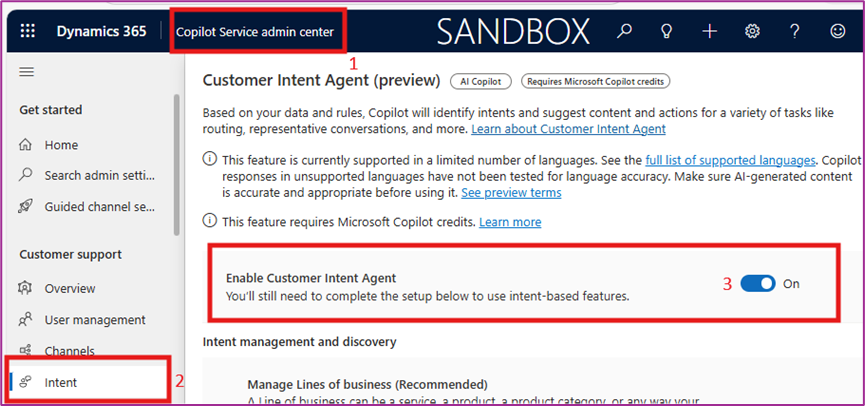
- Enable the customer intent agent in Customer Service Admin Center
Phase 3: Intent Discovery & Simulation
- Bulk Mining: Start by enabling the agent to analyze the most recent 50,000 historical cases to seed the initial intent library. Setting up intent manually is time consuming and this is really suggested to do.
- Natural Language Guidance: Provide NL instructions to fine-tune discovery accuracy, helping the AI understand specific business terminology.
- Simulation Mode: Use the Quality Evaluation Agent (QEA) to run simulations and fine-tune agent instructions against real data before going live.
Phase 4: Setup Experience profile
To be able to better use the intent in chat, voice etc you need to configure the chat experience in your copilot pane.
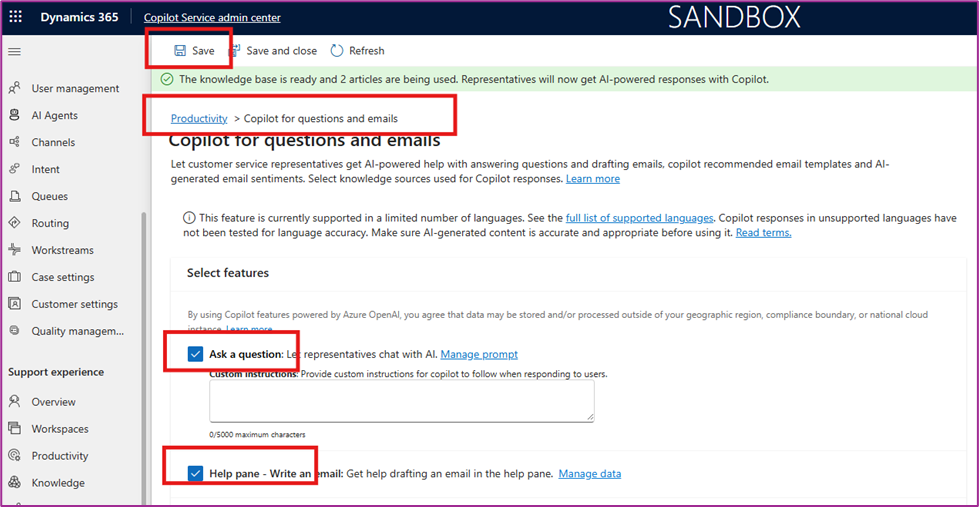
- Before enabling Experience profile, validate and enable Copilot for questions and emails by following Copilot Service Admin Center -> Support Experience -> Productivity -> Copilot for questions and emails and enable [Ask a question] & Help pane.
- Copilot Service Admin Center -> Support Experience -> Workspace -> Experience Profiles -> Create new.
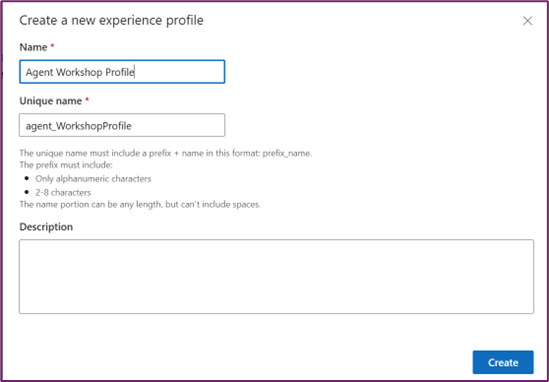
- Next steps of channel setup and settings will be done on the Experience profile page.
- Add your user to the profile
- Enable channels
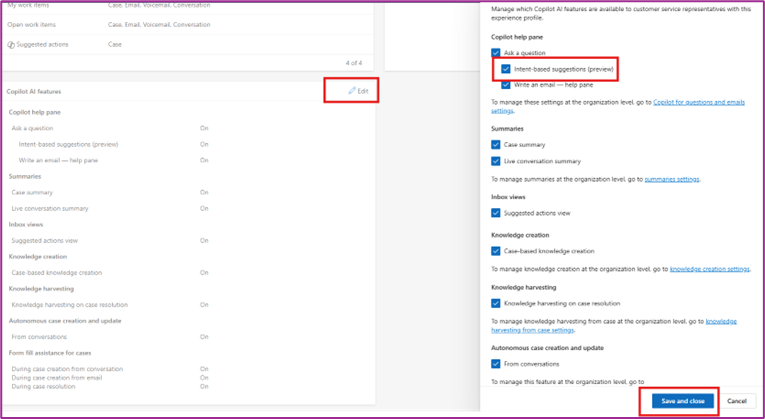
- Enable Copilot pane for the profile – Goto Copilot AI features in the profile and click on productivity pane settings -> Enable Copilot and save.
- Enable Intent-based suggestions
Phase 5: Governance & Guardrails
- AI-Assisted Mode: We recommend starting in «AI-assisted» mode. This allows human supervisors to review discovered intents and drafted knowledge before they are promoted to «Autonomous».
- PII Scrubbing: The agent automatically removes personal data and sensitive information from source content before any knowledge drafting or intent mining occurs.
Conclusion: The New Lifecycle of Service
The transition to an agentic platform is not just about automation; it is about Institutional Memory. By deploying the Intent Agent, architects ensure that every interaction whether bot-led or human-assisted is grounded in a unified, perpetually updated understanding of the customer.
Strategic Tip: Don’t try to automate everything at once. Focus on 1 or 2 common scenarios, build those intents with natural language instructions, and use the Self-Learning Loop to expand your capabilities organically.