Human-in-the-Loop AI Contact Center: Is It Becoming a Bottleneck?
Is the human-in-the-loop AI contact center becoming a bottleneck as AI agents grow more autonomous?
As a result, as AI agents evolve from simple FAQ bots into autonomous digital workers, the idea of a self‑operating service center is no longer science fiction. The technology is here.
The real question is more uncomfortable:
Are we actually ready to hand over the keys?
After attending the Microsoft Business Applications FastTrack AI Bootcamp in Reading, one thing became very clear: we are standing at a tipping point. We are moving away from traditional systems of record—software designed primarily to store information and into the era of systems of intent, where understanding why a customer is reaching out matters more than how they phrase their request.
At the heart of this shift is Microsoft’s first‑party Customer Intent Agent.
The Brain of the Next-Gen Contact Center
At the same time, the Customer Intent Agent is essentially the «brain» of the modern service operation. While traditional bots rely on rigid keyword matching, this agent uses generative AI to understand the underlying goal of a customer’s inquiry, regardless of how it is phrased.
This intent intelligence powers two critical service scenarios.
Self‑Service
In self‑service channels, the agent can:
- In practice, this intelligence enables Copilot agents to identify complex or ambiguous intents
- Ask targeted follow‑up questions to clarify context
- Retrieve grounded, authoritative answers directly from your knowledge base
The result is higher deflection without sacrificing quality or trust.
Assisted Service
By contrast, when human escalation is required, the agent doesn’t disappear. Instead, it becomes an assistant to the service representative by:
- Detecting the customer’s intent in real time
- Summarizing the conversation and extracted context
- Suggesting a next best action based on business logic and knowledge
Customers don’t have to repeat themselves anymore and agents can focus on resolution rather than reconstruction.
The Implementation Roadmap: A Step-by-Step Guide
From a delivery perspective, building this level of autonomy is not just a technical configuration but a also about grounding the AI in your specific business logic. Based on the technical labs in Reading, here is a simplified setup guide to get your Intent Agent live:
Phase 1: Prerequisites and Environment Readiness
First, before touching agent logic, your environment needs to be prepared.
Roles and Licenses
- Microsoft Copilot Studio license
- System Administrator role
- Customer Service Representative role
- Dynamics 365 Customer Service license
Environment Configuration
- Enable AI form fill assistance
- Enable audit history (environment + Case table)
- Ensure Unified Routing is installed and active
Knowledge Base
- Create and publish at least one production‑ready KB article
- The agent cannot generate grounded responses without published knowledge
If your knowledge is vague, outdated, or still in draft, your AI will be too.
Phase 2: Global Technical Configuration
Next, this phase ensures secure communication across Microsoft services.
- Register a single‑tenant application in Microsoft Entra ID
- Create an application user in Power Platform
- Assign the Case Management Agent app and Customer Service Representative role
- Authenticate Dataverse and Copilot Studio connection references
- Enable required Power Automate flows for case orchestration
This is unglamorous work but it’s needed later for the agent to work.
Phase 3: Building Intent Intelligence (The “Brain”)
Most importantly, this is where you define how your business thinks.
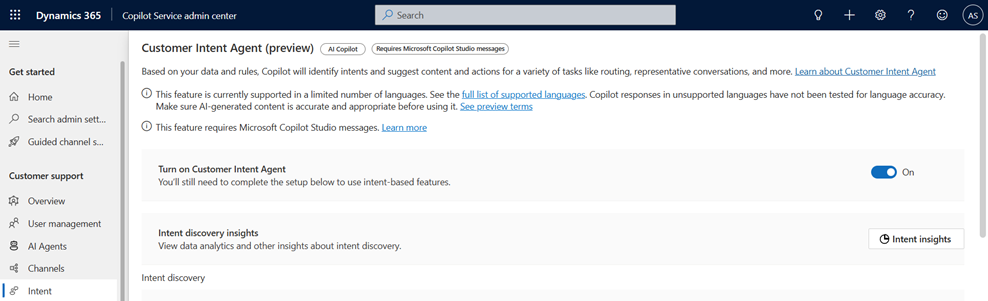
In Copilot Service Admin Center:
- Activate the Customer Intent Agent
- Define Lines of Business (LOBs) aligned to your domain model
- Configure case rules to scope where intent detection applies
- Create intents using natural language instructions, not rigid logic
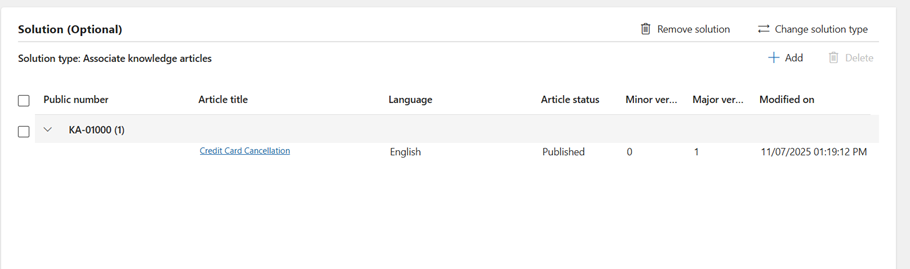
- Associate each intent with a published solution (KB article)
- Group related intents for reuse and scalability
This is where AI stops being generic and starts being yours.
Phase 4: Copilot Studio Orchestration
With the brain in place, it’s time to wire it into the customer experience.
- Configure the Intent‑based suggestions topic
- Set authentication to maker‑provided credentials
- Route relevant paths from the greeting topic
- Publish the agent and confirm authentication
At this stage, the intelligence is wired into the customer experience.
Phase 5: Channel Integration and Testing
Finally, connect the agent to real conversations.
- Add the Copilot Studio agent to your active workstream
- Test the “golden path” scenario end‑to‑end
- Validate both autonomous handling and escalation behavior
A successful test doesn’t just answer correctly—it hands over context flawlessly.
Troubleshooting Tip
If the agent isn’t providing the right answers, check your published knowledge articles. The AI is grounded in this data; if the article is in «Draft» status or lacks specific details, the agent will default to a generic response or escalation.
Proof in Practice: The Credit Card Scenario
For example, during the bootcamp, we tested this with a credit card cancellation scenario. When a customer initiated a chat with «Hi,» the Intent Agent immediately identified the cancellation goal. It was able to discuss the impact of the cancellation and offer alternatives pulled directly from the knowledge base. If the customer insisted on speaking to a human, the live agent was presented with a full summary of the AI’s findings, preventing the customer from ever having to repeat themselves.
Are We Ready to Hand Over the Keys?
Handing over the keys doesn’t mean removing the human; it means moving them to a supervisory role. As we learned in Reading, agents are probabilistic, meaning they require constant evaluation and fine-tuning rather than one-time testing.
Ultimately, the «human-in-the-loop» only becomes a bottleneck when they are forced to do the manual classification that AI is now better equipped to handle. By deploying a Customer Intent Agent, you free your experts to focus on the high-value, high-empathy moments that truly define your brand.
For the latest technical updates and detailed walkthroughs, I highly recommend exploring the training paths on Microsoft Learn.
- Build copilots with Microsoft Copilot Studio: This is the essential starting point for creating the «brains» of your agents, including the inbound actions and authentication we used in the labs.
- Enhance Microsoft Copilot Studio copilots with AI: Deep dives into using generative AI features to handle natural language and complex intent discovery.
One thought on “Human-in-the-Loop AI Contact Center: Is It Becoming a Bottleneck?”